I was delighted when SOFA passed 30 downloads in 2009 and here we are in 2017 more than 250,000 downloads later – still can’t believe it :-). Even though Sourceforge seems to have become confused about how many downloads there are having “lost” a whole lot in the last couple of months I am pretty confident we really have crossed the quarter-million mark. BTW a major new version of SOFA is in the pipeline and will be released when I fix some Mac installer problems.
Archive for the ‘general’ Category
SOFA passes quarter-million downloads
Friday, January 27th, 2017Using SOFA on multiple machines with synced config and data
Tuesday, April 26th, 2016One of the nice things about open source software like SOFA Statistics is that you can freely install it on as many machines as you like without licensing issues, complex validation etc. But how do you keep your content in sync across all the different devices? One approach is to keep the user sofastats folder in a synced drive.
1.4.6 Adds basic time series
Friday, January 1st, 2016SOFA line charts and area charts now treat dates as dates in the x-axis which makes it easier to look at time series data.

New option added to interface

Time series selected – X-axis date aware

Time series not selected – X-axis not date-aware

Example time series chart
Additional improvements include:
- Better error message when not enough values in group to run analysis e.g. ANOVA.
- Better handling of precision in p-value results displayed.
- Better handling of dates pre-1900.
- Better messages to user about potentially excessive categories in charts.
- Add support for float years as date values for time series.
- Add support for specifying port connecting to postgresql.
- Allows boxplots when fewer values to display.
And there were two other changes:
- Removed broken google docs integration – just as easy to manually download and import normally.
- Removed two pop-ups – no longer needed.
There are also a number of bug fixes:
- No longer a missing legend in multiseries scatterplots just because the first scatterplot only had one series of data.
- Fixed bug with saving database connection details when a number involved (port).
- Fixed PostgreSQL bug when saving connection without password – now succeeds rather than failing silently.
- Fixed MySQL bug with adding rows.
- Fixed bug in Windows with checkboxes not enabling/disabling properly unless panels refreshed.
1.4.5 More box plot options
Saturday, August 15th, 2015There are several ways of doing box plots. Some show outliers, some don’t. Some set the whiskers at the min and max values, some don’t. Until now, SOFA kept it simple by only allowing one approach. But sometimes a little more flexibility is needed. So now users can choose between three options:
Option 1) This is the default. Outliers are displayed. Lower whiskers are 1.5 times the Inter-Quartile Range below the lower quartile, or the minimum value, whichever is closest to the middle. Upper whiskers are calculated using the same approach.
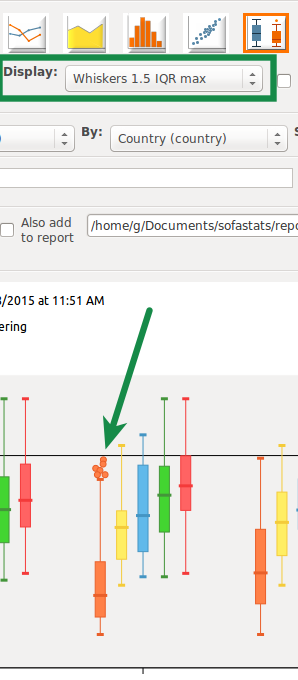
Option 2) Outliers hidden. Lower whiskers are 1.5 times the Inter-Quartile Range below the lower quartile, or the minimum value, whichever is closest to the middle. Upper whiskers are calculated using the same approach.

Option 3) Whiskers are at the minimum and maximum values.

And SOFA displays a small note at the bottom of each box plot so it is clear what approach has been used.
Additionally version 1.4.5 adds:
- ODS importing can now cope with repeated column names.
- Better error message when unable to get regression line details because of limited variability.
And there are numerous bug fixes as well:
- Fix bug when problem with imported data.
- Fix to title and date concatenation code so doesn’t break when title has non-ascii characters e.g. in Spanish (affecting Windows and Mac)
- Reordered regression line plotting in js so appears on top of dots.
- Added zero division error trap to spearman’s test error output.
- Fixed bug which prevented ods_reader from importing repeating rows at the end of a spreadsheet. Only repeated empty rows at the end are considered the end of the data.
- Properly handle all read operations on internal-use text files e.g. proj, css etc. Can cope with a utf-8 BOM (only) to cope with Windows Notepad editing. Breaks if other encodings used which is fair enough.
We hope you like the latest version.
SOFA website OK now on Mobile
Wednesday, June 24th, 2015The SOFA Statistics website is now “responsive” – that is, it finally works well on mobile devices. I used Bootstrap to achieve this and had a major clean up of cruft. If there are any problems, let me know.

Using SOFA alongside other statistics packages
Saturday, February 15th, 2014All statistics packages have their strengths and weaknesses so it is not uncommon for people to want to use more than one – even on the same project. SOFA is focused on making it easy to use some core statistical tests and producing attractive, high definition tabular and charting output. SOFA also makes it easy to link to, or import from, a wide range of formats: xls, xlsx, csv, google docs spreadsheets, MS Access, NySQL, MS SQL Server, PostgreSQL, SQLite, and, more recently, CUBRID.
But there is no point overcomplicating SOFA so it can do every statistical test that might be needed for a particular project. SOFA users have been routinely surveyed on what features they would like added and it has not consolidated into a clear list of priorities. People need lots of different things depending on their specific projects.
So a sensible goal for SOFA is to make it easy to import and export data, including metadata such as variable and value labels. This strategy has already resulted in the addition to SOFA (version 1.4.2) of built-in export-to-spreadsheet functionality. And it has already been improved for version 1.4.3 (not released yet at the time of this writing).
The question is, what packages should SOFA target as priorities for interoperability? Feel free to fire me off an email at grant@sofastatistics.com.
1.4.1 Adds regression line for scatterplots
Friday, January 31st, 2014Scatterplots can now be produced with a regression line and slope and intercept details:

Additionally, the Export output plug-in (proprietary add-on) now gives option of exporting tabular data to spreadsheet. And there are some other minor improvements:
- Better positioning of legend in scatterplots made by matplotlib.
- Tweaked algorithm for getting optimal min and max axis values so more sensible when no variation.
The latest release also fixes a number of edge-case bugs:
- Fixed bug in charting when users use variable names SOFA used in underlying SQL queries.
- Fixed bug when refreshing database table dropdowns when no databases visible – was assuming the databases were included in the number of items in the sizer.
- Fixed bug when print content redirected to output file in Windows and Mac – now coverted to utf-8 byte strings directly by overriding sys.stdout and sys.stderr with codecs.getwriter etc. Immediate impact is fix for bug when recoding a table and field names include non-ascii characters.
- Fixed up fonts used so always look good on all systems.
- Fixed bug which can occur when designing a new table. If we recode it before clicking the Update button, SOFA thinks we are trying to override another table of the same name. This is because SOFA started out thinking our table had no name and was never updated to tell it otherwise.
- Minor changes to enable translation.
- Fixed bug when importing empty pairs of double or single quotes. These were already being de-escaped (as a side-effect of the approach necessary to handle internal quote escaping in the csv module) and turned to solo quotes – and thus evading the check for blank raw vals which would have been turned to NULL.
- Fixed bug giving error message for too many rows instead of too many columns when too many columns e.g. in Chi Square test.
- SOFA now checks very early to see if you’ve installed SOFA under a local user folder instead of a program folder.
- Fixed bug in PostgreSQL plug-in when working with a numeric field lacking a defined decimal points or numeric precision setting.
- Show scatterplot minor axis ticks more readily so better when fewer distinct x values.
- Scatterplots cope with absence of variability in an axis by forcing a different min and max for that axis.
SOFA releases 1.4.0 for Christmas :-)
Sunday, December 15th, 2013Ease of use is one of SOFA’s main goals (along with “learn as you go”, and “beautiful output”). Unfortunately, as new options were added to SOFA for exporting data, the simplicity of the output section of the user interface suffered slightly. New buttons were squeezed in one by one and the interface was getting more and more crowded. Something was going to have to change. And in version 1.4.0 it finally has! – I hope you like the change. It not only removes two interface items but it also adds room for more export options in the future. And there is more horizontal space in the drop-down control to describe each option more clearly and distinctly.
Here is the old design:


Not too bad, but lots of buttons, and more needed in the future. Here is the new design:

It drops two items. There is also scope for adding more export options. Here are the current options available as displayed in the drop-down control:

Obviously, it wouldn’t be hard to add a few more given it is a list. The Show Results button is larger, and its relationship with the report is more obvious by adding “Also” to “Also add to report”.

Only modest changes in many ways but hopefully another step in improving the user experience. Merry Christmas 🙂
Version 1.3.5 adds some simplicity
Monday, October 14th, 2013Colin Chapman, founder of Lotus Cars, had the following philosophy for automotive design: “Simplify, then add lightness”. Architect Ludwig Mies van der Rohe used to say “Less is More”. In a similar vein, the latest version of SOFA adds some simplicity for all those users who only use the default database (see Database?! But I just want to analyse my data!). Here is the list of feature changes introduced with version 1.3.5 of SOFA:
- Simplified access to data for most users. SOFA now only displays a list of data tables (instead of showing both a list of databases and tables) unless there are multiple databases to choose from. For most users, the only database will be the default database SOFA uses to store imported or hand-entered data.
- Slovenian support added (thanks to Nino Rode :-)).
And the following bugs have been fixed:
- Fixed bug in histogram output when limited data spread. Error caused by miscalculation of significant decimal points required for display.
- Fixed bug stopping late-added title details appearing when exporting output. The demo output is refreshed first so the source file is forced to be up-to-date. Probably needs a proper tidy-up some day but this works well in the mean time.
- Fixed bug in exporting to desktop folder in fix_pdf – need to strip end off folder name when no AM/PM under localisation used.
- Fixed various bugs associated with exporting output. When copying output, message about keeping form open now names form it means (to reduce confusion).
- Fixed bug when using a project after it has just been deleted (by pressing cancel in select projects dialog after having deleted the currently active project).
- Fixed bug which meant “Show Results” and “Add to report” options were displayed when setting up a project.
- Fixed bug when cancelling a variable details selection in a project.
I hope you like the latest version.
Database?! But I just want to analyse my data!
Thursday, August 22nd, 2013SOFA aims for ease of use as part of its “ease of use, learn as your go, beautiful output” mantra. But it confronts users with having to think about databases, even if just working with simple spreadsheets of data or some data entered by hand.
This was the usability problem brought to my attention by a member of the community, Jan Dittrich. Jan (http://mindthegap.blog.bau-ha.us/), is completing a Masters in Media Arts and Design at the Bauhaus University in Weimar/Germany. He mainly does user research and usability, but has an interest in statistics as well. When using SOFA he noticed that a “database” needs to be selected for most of the activities but that it might be a rather technical concept for some of those who use SOFA. He wrote me an email addressing the problem and we subsequently exchanged ideas.
So how to address this without removing one important ability of SOFA – namely the ability to connect directly to people’s data when it is in a database (e.g. MySQL).
We explored a few options …

… but ended up following the principle of “the least we could do” as recommended in the fantastic usability book “Rocket Surgery Made Easy” by Steve Krug.

As Krug notes, tweaking is usually better than redesigning because 1) it actually gets done; 2) larger changes are inevitably going to break some things (think months of squashing all the bugs out again); and 3) redesigns annoy a lot of existing users who have gotten used to the status quo (actually Krug has 9 reasons but these are my favourites).
Anyway, I had no enthusiasm for a major GUI overhaul but it did not make sense to leave a known usability problem in place. What Jan and I came up with was rather simple and elegant. SOFA only shows the Database label and drop-down if the user has configured SOFA to connect to any databases. Expect to see this change in the next version (1.3.5).

Users who have database connections will notice no difference. But for everyone else the interface will be simpler and easier to use. Sometimes, less is more.