Mac package of SOFA Statistics popular

June 9th, 2010

In less than a week the Mac package for SOFA Statistics has been downloaded over 100 times, representing nearly a quarter of all downloads of version 0.9.10.

Example output on OS X

Example output on OS X

A positive response was expected given recent survey results at the main SOFA Statistics website – 35% of respondents wanted the Mac package as the next thing to add to the project. And about 14% of visitors to the main website are using a Mac OS. But it was still nice to see the response.

0.9.10 has Mac OS X Package

June 2nd, 2010

SOFA Statistics has been packaged for Mac OS X (Leopard and Snow Leopard). It only seems right that an application emphasising ease-of-use and beautiful output should be available for Apple users.

SOFA Statistics on OS X

SOFA Statistics on OS X

The installer is supplied as a mpkg (metapackage) file inside a disk image. Open the mpkg to install.

SOFA mac installer

SOFA mac installer

The same application now works much the same on Windows XP, Vista, and Windows 7, Ubuntu/Linux Mint, and Mac OS X Leopard and Snow Leopard.

SOFA controls on mac

SOFA controls on mac

Even if you are not a Mac user, there are a few extras in the new version:

  • MySQL plugin now works with older versions of MySQL e.g. 4.1.
  • MySQL now allows port details e.g. for remote connections.
  • All database plugins allow empty default database or table configuration details (in which case they’ll use the first).
  • Easier to fill in connection details in project. Tooltips (with examples) have been added to database configuration controls to make it more clear what is required from the user.
  • Better placement of dialogs on smaller screens so nothing off-screen.
  • Problems with connection details raise useful message for users.
  • SOFA gives useful message if the SOFA application path is not found because of an unexpected folder name e.g. ‘sofa stats’ rather than ‘sofa’. The Windows installer was also upgraded to give better guidance.
  • Better error messages if anything goes wrong with loading of initial images when starting SOFA.

There are also a few bug fixes:

  • Fixed bug in calculation of total frequency across rows so that missing values are excluded.
  • Background images for tables now available in Ubuntu install.
  • Fixed some minor background bugs.

You can download version 0.9.10 now: SOFA downloads

NB 0.9.10 (zero point nine point ten) is newer than 0.9.9.

10,000 download milestone reached!

May 24th, 2010

SOFA Statistics has now reached the 10,000 download milestone on Sourceforge. And the rate of downloading has been steadily increasing. In May 2009 there were only 30 downloads whereas in May 2010 there are likely to be over 50 times that. The main area of work at the moment is creating a Mac package. Follow this blog or the twitter feed (http://twitter.com/sofastatistics) to stay informed.

10000 downloads!

10000 downloads!

Increasing downloads of SOFA Statistics

May 1st, 2010

SOFA Statistics is growing in popularity, if SourceForge downloads are any indication.

Sourceforge Download Trend

Sourceforge Download Trend

Of course it is early days yet for the project, with version 1.0 not expected until later this year, but current trends are encouraging. It seems there is a gap in the market for an open source statistics, analysis, and reporting package aimed at non-specialist statisticians.

SOFA Statistics and the “R is an Epic Fail” blog

April 26th, 2010

R is an open source programming language and software environment for statistics. And it is not just any old programming language – it is the dominant system for open source statistics. So was it fair to call R an “epic fail” as Dr. AnnMaria De Mars did in her notorious blog post The Next Big Thing?

Clearly R has been a massive success and it has a vibrant and lively community, many of whom were galvanised into making a response by the Epic Fail blog (see An article attacking R gets responses from the R blogosphere – some reflections on the phenomenon and R and the Next Big Thing as an example). So on what terms could it be considered a failure? For De Mars, successful software will be usable by the vast majority of people – not just programmers and others comfortable with command line interfaces.

… if you even LOOK at R code – bug-free or not, compilable or not – it should be evident that this is not how the average person uses a computer. If we are talking about something that is going to be used by a large number of people, R is not it (Comment by De Mars on her own blog post – The Next Big Thing).

… If your target market is “People who own cars that drive from point A to point B” that is much BIGGER than “people who work on engines”. If you are looking for a job making things or selling things or providing services, the former is more likely to pay off for you than the latter.
Telling people that if they can’t appreciate an internal combustion engine they are too stupid to own a car probably won’t help, either.” (The Next Big Thing).

And in these terms, De Mars has a point. For many users, R needs a GUI. I like this quote tweeted by ravkalia (a big fan of R BTW): “Overheard at a computing meeting: ‘R is not a programming language, it’s a statistics package with the GUI missing.'” Of course there are various projects to provide a GUI interface for R but it can be argued there are limits to how far that can go given the inherent flexibility of R as an environment. Yihui Xie recently commented – “I prefer the command-line due to its flexibility. GUI cannot hold infinite components (buttons, drop-lists, check-boxes, …), whereas there are almost infinite possibilities in commands.” (r-is-an-epic-fail).

On her other points regarding R and data visualisation, and analysis of enormous quantities of unstructured data, De Mars is on shakier ground, but the observations about the mainstream preference for looking and clicking are valid.

So how does this relate to SOFA Statistics? SOFA stands for Statistics Open For All, which gives a strong hint as to where SOFA is aiming in terms of user interfaces and target audience. In practice this means:

  1. A simple GUI. In practice, this means trying hard to leave the right things out rather than adding in every possible option. Sometimes less is more. Think about your TV remotes.
    Interface chaos

    Interface chaos

    Some commentators have implied that a GUI is not important because the sorts of people who do statistics will also be comfortable with basic programming. But this is not always true. And lots more people, by several orders of magnitude, need to run basic statistical analyses than just specialist statisticians. Karen Grace-Martin put it especially well in her response to the Epic Fail post:

    “I primarily help researchers, mainly in biology and social science, apply statistics to their research. They are not doing “business analytics,” do not have enormous databases, and really have no need to program anything beyond what SAS or SPSS syntax does. They are not programmers or statisticians, and they don’t have backgrounds in programming or math.

    I believe they are the kinds of users of statistics that you are referring to and I agree with you wholeheartedly that they are probably the majority of statistics users and they have no need for a programming language. They don’t want to nor need to program new statistical procedures.

    There are clearly people who do, but I agree they’re not the majority. At least not in the fields I work.” (The Next Big Thing).

    Even full-time specialist statisticians may find it easier to use a simple GUI for basic data exploration e.g. generating simple frequency tables and cross tabs. It has been suggested that people should expect to use more than one package (SPSS, SAS, R, Stata, JMP? Choosing a Statistical Software Package or Two) SOFA Statistics may be a useful complement to R for many users.

    And ease of use should not be premised on the assumption that people will be heavy users of the package – or of statistics in general, for that matter. The program needs to make it easy to become productive in a hurry.

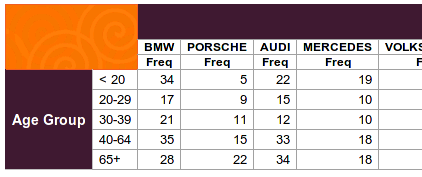
  2. High priority on aesthetics. Output needs to look attractive; beautiful if possible.
    Lucid spirals demo

    Lucid spirals demo

    Even the program itself needs to look good:

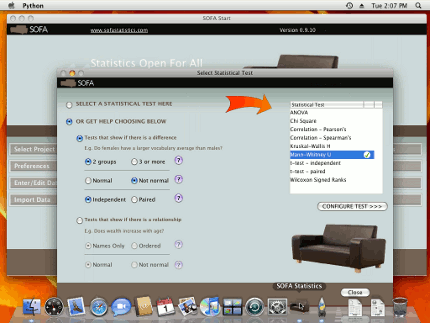
    Form for selecting appropriate statistical test

    Form for selecting appropriate statistical test

  3. One True Way of Doing Things. It is not enough that there is a way of doing something – it can’t be buried somewhere obscure, and it has to clearly stand out as being correct and current (unlike some community technical advice).

    * In the Zen of Python (type import this into your Python interpreter) there is this gem: “There should be one– and preferably only one –obvious way to do it.”

  4. Helping the user when errors occur. Ideally, there would never be any errors but given there are it is important to make them as useful as possible. This is an ongoing project in SOFA Statistics which is being given a high priority. Error messages are an important part of the interface and one of the most important to get right. The better the error messages, the less support people need and the happier they are (under the circumstances). Jon Peck commented on an unhelpful error message he receives from R:

    Here is an error message that I get a lot from a popular R package.
    ‘Error in optim(0, f, control = control, hessian = TRUE, method = “BFGS”) :
    non-finite finite-difference value [1]’
    I know what that means. Would an analyst?
    (Jon Peck – in response to The Next Big Thing)

  5. Not relying on users to stitch together everything they need. Ordinary users benefit if their application bundles together related output. This is a balancing act and one which we want to get right for the target user group for SOFA Statistics. The following quote captures the tradeoffs well:

    But one thing is clear to me: R aims at people who know what they are doing. Absolutely. You can see this with standard output in R which is very minimalistic. You must ASK R what you want from it. SAS and SPSS put everything out. And therefore you need to know how to program in R to use it, really. But if you do, you feel bound and limited with SAS or SPSS. (comment by mocianmomo in response to SAS v. R: Ease of learning).

  6. SOFA Statistics uses Python for Scripting. Python is a language consciously designed to be easy to learn. Many statisticians find it a pleasure to work with Python but the same is not always true of the syntax of many statistics packages, especially those with lots of historical cruft.
  7. Example SOFA script

    Example SOFA script in Python

0.9.9 attractive new output styles; easier to change styles; UI improvements

April 24th, 2010

Although this latest release has many, many enhancements and fixes (full details below), the most pleasing change for most users will probably be the availability of some attractive new output styles. It is also easier to select and apply them.

The 3 new styles are:

  • Grey Spirals
    Grey spirals demo

    Grey spirals demo

  • Lucid Spirals
    Lucid spirals demo

    Lucid spirals demo

  • Pebbles
    Pebbles demo

    Pebbles demo

Output styles can be selected using a simple drop-down list.

Style selection

Style selection

The full list of new features is:

  • Added 3 attractive output styles – grey_spirals, lucid_spirals, and pebbles. These include background images.
  • Styles can be selected and changed much more easily.
  • Crosstabs with column totals and row percentages get a frequency in the total column even if frequency is not selected.
  • Customised waiting message when making report tables according to what is required e.g. “Add and configure column”.
  • Configuration settings (e.g. preferred output style) persist across all dialogs.
  • The last configured row summary measures are the default for any new variables added to the row summary report table.
  • The Expand button opens a much larger window to view content in.
  • Better display of html messages in report tables dialog.
  • Simplified standard names e.g. “SOFA_Default_db” became “sofa_db”.
  • Can resize some dialogs smaller than initial display size.
  • Application gives a useful error message, even if it fails very early.
  • Faster production of report tables by avoiding duplicate queries.
  • When adding row or col vars, can double click selections except for raw display tables or rows of row summary tables where still multichoice selections.
  • Removed windows manager close buttons from dialogs so program close buttons used instead.
  • Windows installer now installs Python 2.6.5 instead of 2.6.2.
  • Misc UI changes to make setting up MS connection details easier.

There have also been numerous bug fixes:

  • Debian package now uses desktop icon sofastats.desktop rather than sofa.desktop to prevent collision with sofa-apps.
  • Fixed bug when selecting default project to edit after having selected another. Would set proj dropdown to point to the first proj (more generally, the last one that was saved and was not read-only).
  • No longer possible to overwrite the default project with another of the same name.
  • In the report table dialog, the Add Under button for columns only shows when a column variable has already been selected.
  • Add Under button for rows disabled for Row Summaries.
  • Fixed bug where right clicking on a row or column variable in the report tables dialog tree didn’t shift selection to it.
  • Fixed bug where selection in report tables dialog row/column tree should shift to another item sibling but went nowhere.
  • Fixed bug if MS Access database selected multiple times. Needed to properly clear resources before getting them again.
  • Fixed bug running some statistical tests when variable includes % in name.
  • Fixed bug where unable to change cell values in strangely named tables e.g. ‘demo;’.
  • Fixed bug where some faulty values for DataDets would get through even if an error.
  • When faulty database selection made, e.g. MS SQL Server model, reverts to last selected database.

0.9.8 Viewing and organising output reports simplified

April 9th, 2010

The latest set of changes are the direct result of user input. A user emailed us to say he found working with the output reports a bit confusing and the end result was a better way of viewing and organising output reports.

So here’s how it works. If you start saving output, it goes into the default html report file. If you want it to go into an existing html file, you select that using Browse and it will be added there. And if you want to create a new output file, you can just browse to the correct folder and enter the file name. Pretty simple and flexible as well.

Make new output report

Make new output report

As for viewing output reports, it has always been possible to use your file manager to locate your output file and double click it (thus opening it as a tab in your default browser e.g. Firefox). Now it is much easier – just click on the new View button next to the report name and it will automatically open as a tab in your default browser.

New output view button

New output view button

Your output opened in your browser

Your output opened in your browser


Here is the list of main changes:

  • Can view output reports from SOFA Statistics using a View button. Clicking View opens the selected report as a fresh tab in the default web browser.
  • Can create new reports using the Browse button for reports by navigating to a folder and entering the name of the new report.
  • The four Browse buttons (e.g. for browsing reports) now have hover text help to explain what they are for.
  • Misc UI changes to make setting up MS connection details easier.

A few bugs were fixed as well and there was a major set of changes to prevent future bugs related to database connections:

  • Huge overhaul of approach to connecting to databases. Should be no detectable difference above the surface (apart from being slightly faster perhaps) but should prevent lots of bugs in the future.
  • Fixed bug where unable to change cell values in strangely named tables e.g. ‘demo;’
  • When faulty database selection made, e.g. MS SQL Server model, reverts to last selected database.

Good future for SVG/Javascript graphing

March 31st, 2010

Whether SOFA Statistics finally settles on RaphaelJS

RaphaelJS Pie Chart

RaphaelJS Pie Chart (NB dynamic in live version)

… or Dojo for output charting I am glad that it will be using SVG (and Javascript). These technologies, and support from them by mainstream web browsers, is only going to get faster and better.

Although the example below is not a graph it gives a taste of what is possible using these technologies: http://svg-wow.org/audio/animated-lyrics.html. Imagine being able to add comments and highlights directly to a chart which you can share with anyone. No proprietary viewer necessary :-).

BTW the reason output charting is not yet available is because I’m waiting till the wxWebKit widget supports it. wxWebKit is the technology SOFA Statistics uses to display HTML (web content) internally. The good news is that the improvements to wxWebKit should be ready by June or July.

0.9.7 Improved data design, report tables, and ODS importing

March 30th, 2010

There are four big changes in the latest version. They’re not really new features as such – the changes are mainly focused on making SOFA Statistics more pleasant to use. We hope you like it :-).

1) When designing or redesigning data tables, users now have visual feedback on the changes made in the form of a demonstration table:

Data design form

Data design form

2) The Projects form has been made a bit more attractive and coherent. Hopefully, it will be easier to use:

Project form refreshed

Project form refreshed

3) Demonstration report tables are more visually distinct from actual report tables (i.e. those run off the data):

Demo tables more faint

Demo tables more faint

4) Better guidance when asking if a csv file or spreadsheet has a header or not:

Import has header

Import has header

Here is the full list of improvements:

  • When designing or redesigning a data table, users can see a demonstration table showing their changes as they go. It uses a few rows of real data where possible to be more realistic.
  • When prompted to choose whether import source file has a header or not, example images appropriate to the type are shown and the options are ‘Has header row’, ‘No header’, and ‘Cancel’.
  • Demonstration text data is now more varied in width and more sensible.
  • The Projects form has an improved appearance and is more friendly and easy to understand.
  • Styling of report tables improved, especially for the raw data list table.
  • Demonstration tables are more visually distinct from report tables based on actual data (more faint).
  • Better details left for user if unable to connect to a type of database.
  • Can now use delete key when naming fields in data table design view.

And there are bug fixes:

  • Fixed ods import bug where repeating columns with values were only treated as one data cell. Major cleanup of ods importing code.
  • Copes with user having multiple versions of wxpython installed – explicitly uses correct version.
  • Fixed bug when inserting new rows into a new data table design.
  • Fixed small bug where renaming an odd table name in design view wouldn’t result in the original named table being deleted.
  • Empty strings not accepted as valid SQLite tables or fields.
  • Fixed bug where enabling of Import button lagged changes to text for source name and SOFA Table Name.

0.9.6 Easier frequency tables; faster large data tables; can import Calc/Gnumeric spreadsheets

March 22nd, 2010

The latest version of SOFA Statistics (0.9.6) is well worth the upgrade.  Deep down, I was never happy with the approach to creating frequency tables.  It was elegant in some ways to think of frequency tables as a special case of a rows x columns report tables but it was still a mistake.  Now there are four types of report table – Frequencies, Crosstabs, Row summaries (means etc), and simple Data Lists.  Here is how to make a simple Frequency Table for Age Groups with column percentages:

New Frequency Tables Interface

New Frequency Tables Interface

Also, large data tables load almost instantly now.  The table I just opened was over 200,000 rows and it simply appeared as soon as I clicked on the Open button.

The third major advance is for people who want to work with spreadsheets.  Until now, Excel has been the only option, which is only available on Windows systems.  Now users can enter data into an OpenOffice Calc or Gnumeric spreadsheet and it should be possible to import it successfully.  Please let me know how that goes.

ODS spreadsheets

ODS spreadsheets

Here is the full list of new features:

  • Added Frequencies as new report table type and substantially improved ease-of-use.
  • Major speed-up when opening data files as larger files no longer have their columns autosized.  There is a button to allow that to be triggered manually.
  • Now able to import from ods files including OpenOffice Calc and Gnumeric-derived spreadsheets.
  • Action buttons on report tables form enabled/disabled according to completeness of configuration data.
  • The import button is disabled until suitable file and table names have been entered.
  • Shifted more close buttons to bottom right location.
  • Minor improvements to wording of importer dialog to reduce possible confusion.
  • The actual results continue to show for a report table if the user cancels changing the row or column configuration.  Doesn’t revert to demo data.
  • Importing now turns single dots ‘.’ into nulls (missing data) and informs the user.
  • Better error messages if import file not found.  Sets focus on SOFA Table Name if not provided.  Better handling of missing/misnamed css files.
  • Variable setting dialog now appears in more sensible position – esp on a notebook or netbook.

The bug fixes will probably be as important, especially if you have experienced any of them:

  • Fixed integer division issue which meant all row and column percentages were rounded down. Now 100.0* … rather than 100* …
  • Now copes with odd field names like ‘weight(kg)’ and ‘strength/100’ that would have broken SQL.
  • Opening the project select dialog now displays the notes for the selected project, which is not necessarily the first one.
  • Fixed bug which made csv importing unable to recover from data type mismatch. Also fixed bug in csv importing when importing missing cells. Now actual extracts nulls rather than the text ‘None’.
  • Minor fixes to row button enabling/disabling on report table dialog.
  • Fixed misc bugs that became apparent in Windows: right clicking opened dialogs twice; faulty script generation after changing table type; problems with ending busy cursor; and not giving proper message when no data in table.
  • Fixed raw table display problem – now shows raw value if no label available for particular item.
  • Project notes can cope with backslash U etc. Now escaped when written to project file.
  • Can view internal tables with dots in the name.