SQL & integer division (why 5/2 usually equals 2!)

March 15th, 2010

I came across integer division in Python 2.x. If you divide one integer by another you get an integer result. So 5/2 = 2 instead of 2.5. You get floor division, not true division (Python – Changing the Division Operator). In Python 3, true division is the default (thank goodness) but in Python 2.x you need to make one of the numbers a float to get a float returned. So 5.0/2 = 2.5. I was bitten by this early on and know the standard way of handling it.

What I didn’t know was that integer division was the norm in SQL database SELECT statements. I had mainly been using MySQL and MySQL was pretty unique as it turned out:

MySQL by default does floating point division, even if both operators are of type INTEGER, so the above [1/2] would return 0.5 in MySQL. All of the other database engines tested do integer division, and return an integer result. (SQLite – Differences Between Engines).

Anyway, in SOFA Statistics, row and column percentages were affected by this behaviour and always returned x.0 %. There was never anything other than zero after the decimal point. The fix was very simple. Instead of SELECT … 100*(num/denom) the relevant code is SELECT … 100.0*(num/denom). The 100 is now a float for those who missed that small but significant difference.

0.9.5 major bug fixes for data importing & better default form height by screen size

March 10th, 2010

SOFA Statistics continues to push on towards an eventual 1.0 release. Even though SOFA is still tagged as an early release on the main project website, and as a beta program on the SourceForge site, there have been over 7,000 downloads already. And the current release feels more solid to me than some of the expensive proprietary products I have used in my career as a researcher and analyst. Of course, please feel free to report any bugs that you find (http://groups.google.com/group/sofastatistics) so they can be fixed before the next release.

The basic list of new features is:

  • SOFA now detects screen resolution and sizes height of dialogs/controls accordingly to better handle both netbooks and larger screens.
  • Now able to delete rows in data entry/editing and configuration tables using the delete key.
  • Added hyperlinks to main form for main project website and community website.
  • The project configuration window can be completely resized making it easier to see all settings.
  • The read-only default project form now has an OK button at the bottom right so it can be closed the same way as every other form.
  • Added preliminary chart configuration form. Output charting still under development. In some ways this is the most important development, even though it doesn’t offer anything to the user in the current version apart from a taste of the likely interface.
  • Hovering over image buttons now shows a different cursor in Ubuntu so users know that they are buttons they can click.

And the bug fixes of course:

  • Spreadsheets lacking a header are now correctly imported including the first line.
  • All forms of data import now cope with data which has altered field names in preparation for import into SQLite.
  • Clustered bar charts in the Chi Square output work even if there are lots of bars missing from some clusters.
  • Removed import statement that caused problems on some systems.
  • Button clicks occurring while inside a configuration text box now work as expected on first attempt.
  • If the primary key for an MS Access database lacks autonumbering, it will only be eligible for saving if it has a non-missing value.
  • Hourglass doesn’t remain open too long when clicking Expand button in Ubuntu.

I’m currently running a small poll on the main project page about the most important things to work on next (http://www.sofastatistics.com). Please vote if you haven’t already.

Follow sofastatistics on twitter

March 3rd, 2010

I finally succumbed and created a twitter account – you can follow the project on http://www.twitter.com/sofastatistics.

Why should statistics be Open For All?

February 21st, 2010

SOFA stands for Statistics Open For All. What does “Open For All” mean and why is it important?

Open For All means:

  • The statistical algorithms used are visible and can be examined by interested users with minimal difficulty (and no Non-Disclosure Agreements required etc).
  • The software is available in the languages users need. At this stage, SOFA Statistics is available in English and has been translated into Galician (largely) and Russian (partially) but the goal is to include as many languages as possible.
  • The program is available without payment (especially important for students and people in developing nations).
  • SOFA Statistics will run on as many computer environments as practical. Currently, only Windows and Ubuntu Linux are supported, but the goal is to add a Mac package ASAP, and possibly some other Linux distributions.
  • The program tries to reduce the amount of prior learning a user has to have to use the package successfully and appropriately. It is not assumed that statistics can be used without thought or any statistical insight, but the goal is to help the user make the right decisions at the right points.

So why does this matter?

  • So students can easily access useful and educational statistical software (no, a spreadsheet doesn’t count 😉 )
  • To allow smaller, or poorly-resourced organisations e.g. non-governmental social service organisations/charities/groups in developing nations etc to conduct basic quantitative research and to generate useful ad hoc and routine reports
  • Because statistical thinking is a fantastic intellectual resource that deserves greater appreciation. It is a shame that the main idea most people have about statistics is “Lies, damned lies, and statistics”.

0.9.4 Additional output for 3 tests and numerous important bug fixes

February 7th, 2010

0.9.4 is another important release. The new testing regime is identifying and fixing all sorts of quirky bugs, as well as some more significant ones. Please join the discussion group if there are any surviving bugs which are an issue for you (http://groups.google.com/group/sofastatistics).

Here are the new features of this release:

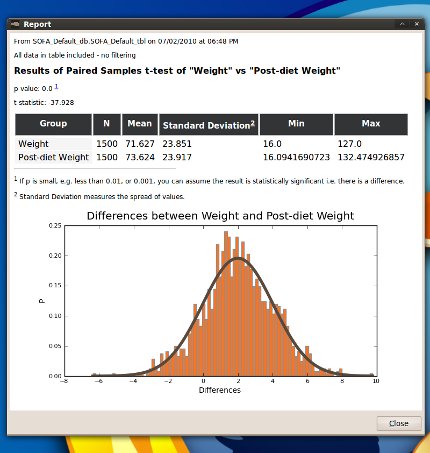
  • Paired t-test output includes a histogram of differences. This makes it easy to assess the normality of the distribution of differences.
    Paired t-test output

    Paired t-test output

  • Kruskal Wallis output now includes a table for each group containing its median, n, min etc.
  • Mann Whitney output now includes medians.
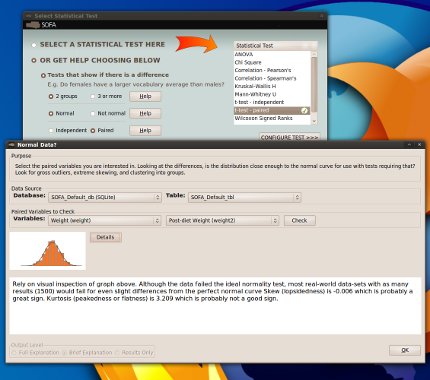
  • If using assistance to select statistical test, the normality help dialog varies according to whether or not paired data is selected. If paired, then two variables must be chosen and the normality of the differences is analysed and displayed.
    Normality of Differences

    Normality of Differences

  • When a cell edit fails validation, the cursor returns to the end of the text if possible, ready to edit immediately. This ends one major interface annoyance.
  • Users receive a useful message if there are no values to report in an analysis e.g. the data is over-filtered.
  • The Chi Square test provides useful messages if too few values in either row or column variables.

The list of bug fixes is quite substantial this time:

  • Independent t-test now works even if using a string variable for grouping.
  • Fixed bug preventing scripts from being run independently of GUI.
  • Fixed bug exporting scripts to the saved scripts file.
  • Fixed minor UI bug which meant the paired option remained visible after the stats selection was back to unguided.
  • Fixed bug that meant if the user moved the mouse away from data being entered the cell editor closed.
  • Fixed bug caused when shifting from one project with a default database engine e.g. MySQL, to another project in which that database is not available. Changing project wipes the stored default database engine.
  • Fixed bug with writing scripts with unicode characters.
  • If unable to calculate kurtosis etc still potentially able to produce rest of results.
  • Chi Square now honours filter values in script version.
  • Projects no longer have problems with new lines in their notes.
  • System copes with faulty project files better.

Development attention will start turning to the following in due course:

  • Mac packaging
  • Making the “results only” and “brief” explanation level settings operational
  • Making more “Help” buttons functional
  • Enabling user-defined missing values
  • Adding an Oracle plug-in
  • Output charting
  • Connecting to on-line educational resources on statistics

How do you feel about the direction being taken? Good? Bad? Any feedback? Please feel free to discuss any aspect of this project at http://groups.google.com/group/sofastatistics.

0.9.3 adds clustered bar charts to Chi Square test

February 1st, 2010

0.9.3 has nice new graphical output for the Chi Square Test and a few other enhancements. At least as important, however, are all the bug fixes. These are the result of a new pre-release testing process.

Underlying the clustered bar charts is the boomslang library, which provides a simplified interface to common matplotlib charts. What a great idea, and what a great name for a Python library.

Summary of new features in version 0.9.3:

  • Chi Square output includes clustered bar charts to display proportions and frequencies for the two variables selected.
    Chi Square output clustered bar charts

    Chi Square output clustered bar charts

  • Drop-downs default to the most recently used database and table. This recognises that most of the time you are using the same table as you used in the last analysis.
  • More helpful messages if trying to use variables with too many values for Chi Square.

Bug fixes:

  • Fix for Linux users with a 4-digit year date format.
  • Fixed encoding display issue for Windows users.
  • Miscellaneous fixes to the behaviour of the table design dialog. Numerous bugs were flushed out by more extensive user testing before release.
  • The Expand button is disabled if a report runs but not successfully (e.g. returns a warning).
  • The default database and table are saved correctly according to database engine (e.g. MySQL, MS Access etc). This ensures valid projects can always open.

SOFA Statistics passes 5000 downloads on SourceForge

January 26th, 2010

5000 downloads is a milestone worth celebrating on an open source project. And SOFA Statistics has finally passed 5000 downloads on SourceForge.

5000 downloads on SourceForge

5000 downloads on SourceForge

Including Softpedia, and the original downloads from the main project website (http://www.sofastatistics.com) and Launchpad, there have been 6,000 downloads in total. The next big milestone for the project will either be 10,000 downloads or version 1.0. Either way, SOFA Statistics will have a lot of additions and improvements before then.

Bullet-point engineering

January 24th, 2010

The features page of SOFA Statistics (http://www.sofastatistics.com/features.php) has a number of bullet points listing features. There is nothing wrong with that. But bullet points don’t tell you how well a feature is implemented or how well it integrates with the rest of the program. Here is an interesting wikipedia entry of relevance: http://en.wikipedia.org/wiki/Bullet-point_engineering . The goal for SOFA Statistics will be to limit the range of features (in the core) but to increase the depth and quality of them. E.g. greater support for users, help with decision-making on appropriate tests, greater ease sharing output or automating report making, more languages supported etc. Beyond the core, it is hoped there will be numerous modules available. But the emphasis for now is on the value of the features added rather than the sheer number of them.

0.9.2 more support charts; portable output

January 22nd, 2010

The latest release has many of the features I have been wanting to add for a long time. In particular, there are more support charts to help users decide if a particular analysis is appropriate. If you run an ANOVA, for example, how normal are all the distributions for the subgroups? And what about variability? SOFA Statistics provides visual assistance for deciding (e.g. histograms with superimposed normal distribution curves) alongside the numerical results of appropriate tests (e.g. the O’Brien homogeneity of variance test). Instead of expecting the user to know the separate steps they ought to take, SOFA Statistics bundles them up together and tries to provide guidance and interpretation. Which is arguably how it should be. For example, how can a user properly interpret an R result from a correlation without a scatterplot? Many users won’t have studied statistics formally for a long time (if at all) and it is easy to be uncertain about exactly what all the rules are.

Re: portable output, SOFA Statistics reports are designed for viewing in web browsers (e.g. Firefox). Now that these reports include images it has become important to make sure they are easily portable. To that end, all internal links to images are relative. This means you can copy a report and the subfolder of its images (sharing the name of the report) anywhere and have the report work properly. It has never been easier to share the results of your analyses.

Here is a full list of the changes:

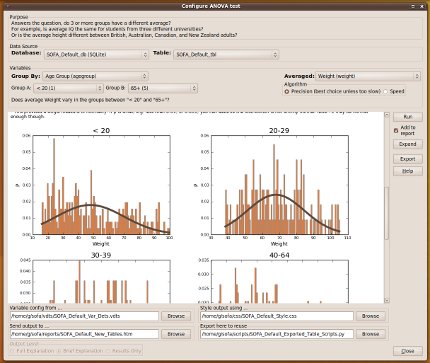
  • ANOVA output now includes histograms for each sample with superimposed normal distribution curves. It also shows kurtosis, skew, and an omnibus measure of normality for each sample as well as the O’Brien homogeneity of variance test. Explanatory footnotes have been added to the output.
    Histograms for subgroups of ANOVA

    Histograms for subgroups of ANOVA

  • Spearman’s and Pearson’s correlation output now includes scatterplots and lines of best fit.
    Scatterplot for assessing linear correlation

    Scatterplot for assessing linear correlation

  • All html reports are portable along with their images (stored in a subfolder of the same name).
  • When titles/subtitles are being changed, the rest of the example report table stays the same. This removes an annoying “flicker” effect when typing in titles/subtitles.
  • The redundant Clear button has been removed from Statistical Test dialogs.
  • An hourglass displays when opening statistics tests and report tables for the first time in case of a brief delay on first use.

There have also been some important and edge-case bug fixes:

  • All images are now uniquely named and stored in report-name-based subfolders if “added to report” has been selected, or in the internal folder otherwise. This guarantees the correct images will always be displayed and that saved HTML reports will work.
  • The page break in independent t-test output has been repositioned to below the histograms.
  • Changing to raw data display, and then changing table source, no longer prevents the example table from displaying.
  • Internal footnotes in expanded output now work for Windows users.
0.9.1 has first of new wave of support charts

January 17th, 2010

0.9.1 is out and there have been a lot of improvements this time:

  • All output now displays inside design dialogs. In the case of report tables, there is an option to expand output. This is especially important for displaying larger report tables on netbooks.
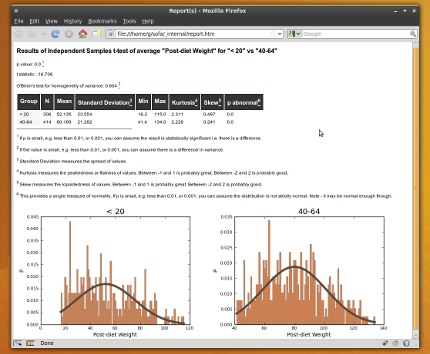
  • Independent t-test output now includes two histograms with superimposed normal distribution curves.  It also shows kurtosis, skew, and an omnibus measure of normality for each sample as well as the O’Brien homogeneity of variance test. Explanatory footnotes have been added to the output e.g. explaining the p value or what kurtosis means.
    Independent t-test support graphics

    Independent t-test support graphics

  • Guidance given on need to assess normality of each sample when more than one (part of test selection process).
  • Hovering over cells in the data entry/editing grid displays appropriate value labels. E.g. hovering over 1 in a gender field may show the tooltip “Male” (if that label has been set up by the user)
  • Can update variable details from within data editing/entry grid by right clicking on column labels. This ability is signalled by tooltips.
  • Date format (e.g. US) is now automatically extracted from the operating system rather than requiring user preferences. Preferences now sets reporting explanation level (still not operational).

There have also been a few bug fixes:

  • Fixed bug in independent t-test where the std dev displayed for sample b was actually that of sample a.
  • Now copes with filter on a string variable when creating divider.
  • Fixed loss-of-focus bug in Windows when typing titles and subtitles after having clicked html widget.