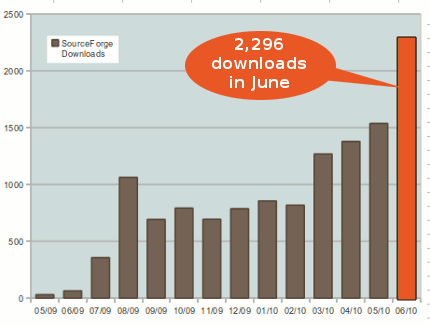
SOFA Statistics has now reached the 20,000 download milestone on Sourceforge. And the rate of downloading has been accelerating. In May 2009 there were only 30 downloads whereas in September 2010 there were well over 100 times that. The main area of work at the moment is getting ready for a version 1.0 release. Follow this blog or the twitter feed (http://twitter.com/sofastatistics) to stay informed.
20,000 downloads and growing
September 30th, 20100.9.18 Beautiful Scatterplots and Histograms
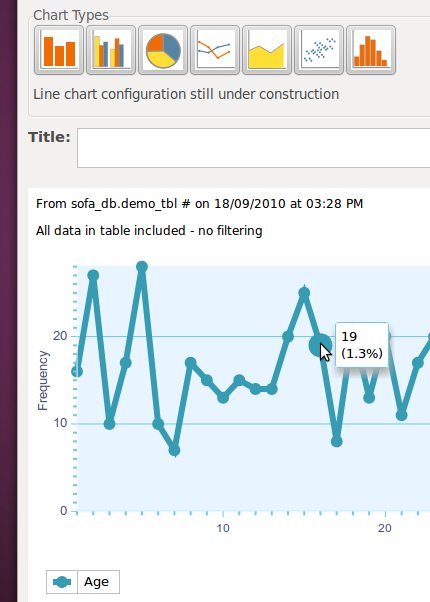
September 25th, 2010With the arrival of version 0.9.18, SOFA Statistics now has all the main output charts working – simple and clustered bar charts, pie charts, line and area charts, histograms and scatterplots. The latest additions are scatterplots …
and histograms:
All support charts are also themed now:
Tool tips now display arrows with their border colour controlled by the selected theme:
Additional changes were:
- Charting dialog devotes more space to displaying chart output. Simplified interface design.
- Charts give sensible message if no data (perhaps because of filtering). X axis labels for clustered bar charts and multiple line line charts where legend doesn’t provide the same label.
- Pie charts slightly wider (esp on Windows, which truncates overwidth labels).
There were also some bug fixes:
- Fixed bug in Excel importing when importing numbers.
- Fixed lucid spiral colours to prevent lines having same colour as background (and being effectively invisible).
- Upgrading adds extra sofa_report_extras.
- Fixed bug when filtering means no data at all to display for normality test.
As SOFA Statistics approaches its version 1.0 release, emphasis will go on enabling chart configuration and filling in any gaps in the existing system.
0.9.17 adds dynamic Line and Area Charts
September 17th, 2010Version 0.9.17 adds dynamic and attractive line and area charts to SOFA Statistics. These are in addition to the existing bar charts, clustered bar charts, and pie charts.
The latest version also features a smaller javascript file for faster loading of charts, and y-axis labelling to charts.
There are also two important bug fixes:
- Fixed bug when importing csv files with non-ascii characters.
- Fixed bug with use of filters of string values – e.g. `gender` = “Male” – in charting.
0.9.16 More beautiful charts
September 13th, 2010SOFA Statistics now has attractive and dynamic Clustered Bar Charts and Pie Charts (as well as the Simple Bar Charts introduced previously).
SOFA charts are dynamic and respond when you move the mouse over them. Unfortunately, the charting library (Dojo) doesn’t work well with WordPress, so static snapshots have been included in this post instead. A live example can be found in the SOFA features page.
It is also possible to style the charts using themes like Grey Spirals and Pebbles.
The other change for charts is the addition of percentage as well as frequency in the tool tips.
The other significant changes are:
- More improvements to installation process, especially on top of existing installations.
- More robust CSV and ODS importing. E.g. SOFA now copes if a field contains double quotes e.g. I enjoyed watching “Inception”
There have also been a number of important bug fixes:
- Fixed problems with csv and ods importing when fields contain double quotes.
- Fixed open office calc import bug when value not in first item of element.
- ODS importing now handles empty formulae cells properly.
- Removed further bugs affecting installation, especially on top of existing installations.
- Fixed bug when hitting enter in text browse control.
- Fixed bug when multiple themes in use for charts in report where only most recent would set the highlighting function. Now operational on a chart-by-chart basis.
- Fixed busy cursor bug when entering faulty data into filter.
- Fixed bug when opening filter dialog from within chart dialog. Was unable to re-enter dialog if exited it.
- Fixed bug in display of group by values after opening chart dialog after an indep 2 vars dialog (e.g. ANOVA) and changing group by var.
You can download the latest version of SOFA Statistics at SOFA Statistics Downloads.
0.9.15 – Eye candy for Bar Charts
August 29th, 2010The latest version of SOFA Statistics finally delivers some visual eye candy in the form of dynamic bar charts. These look good, print cleanly, can be shared easily (anyone with a web browser can view them), and there is lots of scope for further refinement and customisation.
SOFA charts are dynamic and respond when you move the mouse over them. Unfortunately, the charting library (Dojo) doesn’t work well with WordPress, so a static snapshot has been included in this blog post instead. A live example can be found in the SOFA features page.
Version 0.9.15 also copes properly with upgrades e.g. on top of 0.9.14. You can download it from here: http://www.sofastatistics.com/downloads.php
Coming versions of SOFA will add new chart types (probably Pie charts and Clustered Bar Charts first) and the ability to style and otherwise configure them.
0.9.14 Min, max, range, better csv and more
August 12th, 2010Version 0.9.14 has three significant new features:
1) Row stats tables now include min, max, and range.
2) Report tables now visibly separate row variables:
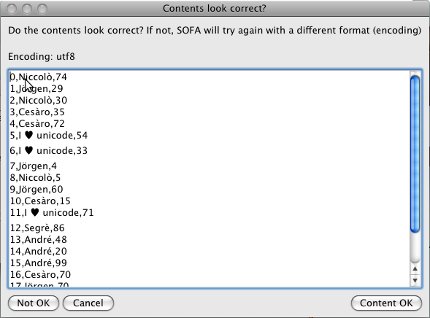
3) CSV importing has been substantially improved. User gets option of confirming or changing auto-identified csv file delimiter and encoding. Confirming presence of a header is also integrated and the first 20 rows are displayed in a table with visible cell borders.
The full list of changes is:
- Added min, max, and range to row stats tables.
- Report tables are much easier to read when there are multiple row variables. Added pale line between row variables in left-most column.
- CSV importing has been substantially improved. User gets option of confirming or changing auto-identified csv file delimiter and encoding. Confirming presence of a header is also integrated and the first 20 rows are displayed in a table with visible cell borders. The import is more forgiving of some faults e.g. missing items at the end of a row. These are automatically filled with empty strings. When errors are encountered in csv import SOFA tells user the relevant line number. Also made other minor improvements to (error) messages from csv importing.
- Added Filter button next to Table dropdown to make filtering functionality of SOFA more accessible.
- Much simpler installation for Ubuntu/Linux Mint users. No additional steps required now that SOFA has started using gtk-webkit.
- ANOVAs and similar group by analyses now cope with massive tables when selecting unique values to show in group by drop downs.
- Appropriate messages are shown to users when large tables underlying analyses are about to be run. The user can opt out.
- Changed default for Anova from precision to speed.
- Better messages when chopping group by values shown.
- If SOFA has been opened by an incompatible version of Python it will give a useful message and leave a helpful text file behind with instructions for fixing the problem.
- Better messages when Chi Square warnings about number of rows, cols, or cells.
- Better tool tip for setting MS SQL Server host e.g. my-svr-01, 1433.
- Added minor improvement to tool tips for data tables. It now always shows labelled value if possible and read only status as suffix as appropriate.
- Created more robust startup process with better error messages. Users also able to run test code (e.g. sent by the SOFA developer) and get result. Great for diagnosis.
- Overhauled start code so checks version if possible, updates version, and makes a recovery folder if not current.
There are also some important bug fixes:
- Fixed bug where only one of multiple databases shown e.g. for MySQL, PostgreSQL, and MS SQL Server.
- Fixed bug stopping MS SQL Server 2005 from opening.
- MS SQL Server 2000 will now open successfully, even if master is not the default table.
- Fixed bug with Chi Square on MySQL caused by dividing Decimal data type by float.
- Hourglass starts earlier when saving filter options.
- Fixed minor bug with display tool tips in read-only tables.
- Now using gtk-webkit inside wxpython. Now displays background images in tables properly in Ubuntu/Linux Mint. Can start working on all output charting.
0.9.13 Recode data e.g. age to age group; better stats support
July 10th, 2010SOFA Statistics 0.9.13 has a number of exciting new features.
1) Easy recoding of data e.g. age to age group:
2) Better support when choosing statistical tests:
When a selection is made SOFA displays some helpful tips to affirm the choice made or suggest alternatives.
The dialog also makes it easy to answer questions about your data which will help make a decision.
3) Better support for importing CSV files with different data encodings:
4) Nicer Windows installer
5) More flexible installation options. Anything containing ‘sofa’ is OK.
There have also been some important bug fixes:
- Recoding copes with REMAINING keyword properly and copes with varied field types properly.
- Generally copes better with system encodings like Chinese Traditional (big5).
- CSV importing handles non-English much better.
- Corrected handling of non-English characters when errors are encountered.
SOFA Statistics growing in popularity
June 30th, 2010June 2010 was easily the best month for SOFA Statistics downloads with 2,296 recorded. This is very encouraging for the project and suggests there is demand for a statistics package prioritising ease of use and aesthetics.
The priority in coming releases is the addition of output charting. Some extra work will also go into the Statistical Test Selection Dialog to ensure the correct balance is struck between providing simple advice to beginners and recognising the multitude of factors which may be relevant to making a decision.
As always, users are encouraged to provide feedback on what they like/don’t like about the program. The goal is to make the best application possible so all feedback is welcome.
0.9.12 Integrated online help and more
June 28th, 2010SOFA Statistics now comes with integrated online help. Clicking on the “Online Help” button opens the SOFA Statistics User Guide in the user’s default browser.
The goal is to make the user documentation as useful as possible – both to new users and to users trying to solve specialised problems. Over time, lots of gaps will be filled so it will be worth making repeat visits to the site.
Here is the full list of new features:
- Now able to look at and manipulate your SOFA data using free and open source tools like Sqlite Database Browser
- Improvements for connecting to Google Docs spreadsheets
- Major improvements to usability around data entry
- Now able to edit variable details from the table config dialog
- Much more useful help when errors encountered importing csv files
Version 0.9.12 also fixes numerous bugs with the Google Docs spreadsheet
0.9.11 imports on-line Google Docs Spreadsheets
June 12th, 2010The latest version, 0.9.11, can import data from your on-line Google Docs Spreadsheets. I will supply more details later, but it is easy to conduct on-line surveys with Google Spreadsheets underneath. And now you can analyse those results using SOFA Statistics.
To connect to your Google account, there is a new button on the standard Import dialog.
This opens a simple dialog letting you sign into your Google account. The existing spreadsheets are listed and then you can select a worksheet. Once this is downloaded, it can be imported in the standard SOFA manner.
Version 0.9.11 also makes it easier to work with read-only columns in data tables.
The final improvement relates to filtering. If you have trouble with the flexible data filtering option, more helpful examples of correct syntax are supplied.
The main bug fix is that SQLite and MySQL now handle fields containing double quotes.